
MenuBar for HEY
Your HEY Imbox and Screener, one click away in the Mac menu bar.
Free and unofficial. Made by Soules Studio LTD (opens in a new tab), and not affiliated with 37signals.
You need a HEY account (opens in a new tab) to use it.
Version 0.6.3, 31.2 MB.
- macOS 15 or later
- Universal, for Apple silicon and Intel
- Notarised by Apple, so macOS opens it without a warning
What it does
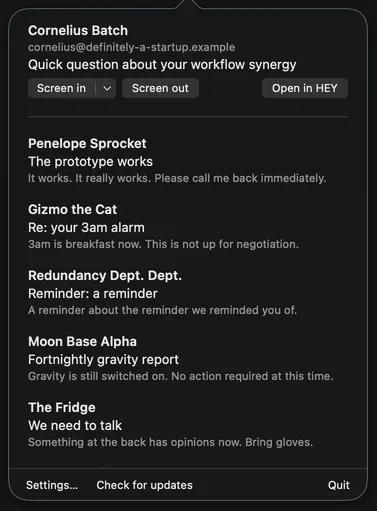
A badge for new threads
A dot on the envelope means someone is waiting in the Screener. The number beside it counts new threads in your Imbox, and a bundle counts as one. It counts nothing else.

The Screener, without opening HEY
First time senders wait in the Screener, and the popover lists them above your new threads. Screen in or Screen out with one click from the top of the popover. Screen in sends them to your Imbox, or to The Feed or Paper Trail from its menu.
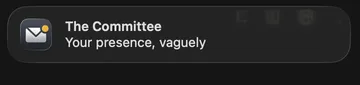
A notification when mail arrives
A thread that lands in your Imbox while the app is connected to HEY arrives as a macOS notification, with Reply Later and Set Aside as its actions.
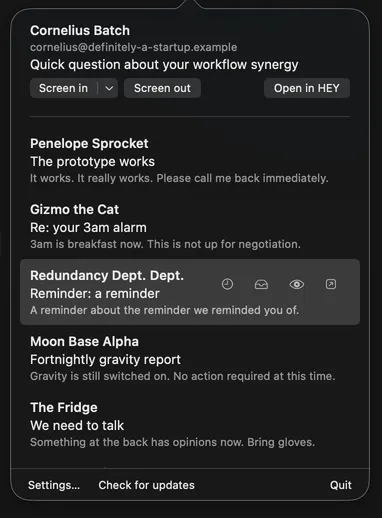
Act on a thread from its row
Hover a row for Reply Later, Set Aside, Mark seen, or open it in HEY. Reply Later and Set Aside move the thread out of your Imbox. Mark seen leaves it where it is and stops it being new.
How it connects
MenuBar for HEY runs the official hey command line tool, which ships inside the app. To sign in, the tool opens HEY's sign in page in your browser.
Your sign in lives in the macOS Keychain and in the tool's own config folder, both managed by the tool. The app never reads them and never stores a token.
Every piece of mail the app shows comes through that tool, running on your Mac. The app never calls app.hey.com itself. Open in HEY hands the thread's address to your browser.
Free
MenuBar for HEY is free, and it stays free.
If it has earned a place in your menu bar, you can give it a coffee. It changes nothing about the app.
There is also a Thank you page.
See what changed in each release in the changelog.