
File for HEY
File for HEY is a Mac app that saves the attachments from your HEY email to a folder on your Mac as they arrive, filed by your HEY labels, for $29 once. It runs on macOS 15 or later.
Stop downloading invoices from HEY. Your invoices, contracts and receipts are already in the folder, ready for your bookkeeper.
Unofficial. Made by Soules Studio Ltd (opens in a new tab), and not affiliated with 37signals.
Free for 14 days with no card, then $29 once. You need a HEY account (opens in a new tab) to use it.
Version 1.0.0, 34.5 MB.
- macOS 15 or later
- Universal, for Apple silicon and Intel
- Notarised by Apple, so macOS opens it without a warning

What File for HEY does for you
Invoices saved without you downloading them
Every month, today
- Open each thread with an invoice
- Download the file
- Rename it so it sorts
- Drag it to the right folder
- Send the folder to your bookkeeper
With File for HEY
It is already there.
Each new attachment is saved about a minute after it reaches HEY, while the app runs. Close the lid and it catches up when you are back. On first run it saves the last one, three or six months, your choice.
Your HEY labels become folders
You have already sorted your mail with HEY labels. File for HEY turns them into folders, so that work carries over to your Mac instead of being done twice. Rather file by sender, or by month? Pick that instead.
A folder your bookkeeper can open
Share the folder once, through Dropbox or whatever you already use, and your bookkeeper finds each new invoice there. They see documents and nothing else. The app keeps no visible files of its own there, except on a drive with no Trash, where removed files go to a folder named Removed by File for HEY.
From any file back to its HEY thread
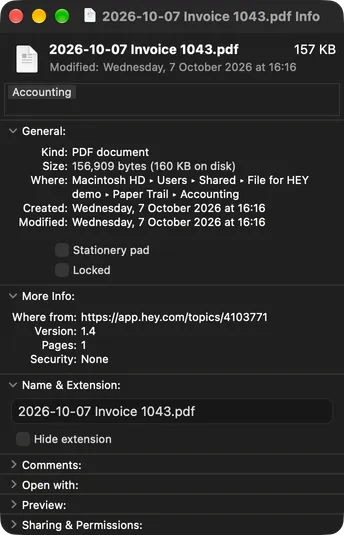
Every file starts with the date it arrived and keeps its original name after it, so your searches still match. Each carries its HEY labels as Finder tags, and when someone asks about an invoice, Get Info shows the link to its thread in HEY.
A one way copy that never undoes your changes
Rename a file, move it, edit it or delete it, and File for HEY leaves it that way. It never deletes anything outright, and nothing you do in the folder ever reaches HEY.
Quiet, unless the mirror stops
Ordinary filing never sends a notification. If the mirror ever stops, because a drive is unplugged or the disk is full, File for HEY tells you why and what to do.
Your mail stays between you and HEY
A folder of invoices and contracts describes your business. None of what is in it reaches us. File for HEY only reads from HEY, and never changes anything there.
File for HEY reaches your mail only through the official hey command line tool (opens in a new tab), which ships inside the app. You sign in on HEY's own page in your browser. The app never sees your password and never stores a token.
File for HEY signs in through the bundled tool the same way MenuBar for HEY does, which the page on how MenuBar for HEY works with the HEY CLI explains.
Already use MenuBar for HEY? File for HEY reuses its sign in, so you sign in once for both.
Anonymous usage data never includes a file name, a folder, a label, a sender or a count of anything. You can turn it off in settings.
The Swift package File for HEY uses to talk to the HEY CLI, HEYCliKit (opens in a new tab), is open source and MIT licensed. File for HEY itself is not open source.
$29 once, with a 14 day free trial
One price, once, for a chore that comes back every month. No subscription, and no account with us.
Try every feature free for 14 days, with no card. The clock starts when mirroring starts, not when you install the app. If you decide not to buy, mirroring stops and every file stays exactly where it is.
You buy from inside the app, through a normal checkout in your browser. Your receipt comes from a recognised seller of record with the tax handled, so it goes straight to your bookkeeper.
One licence covers one Mac at a time, and moves with you to a new Mac. A future update will ask you to activate it once, online. The price is set in US dollars, tax included. Outside the US, checkout may show and charge it in your own currency.
The terms of sale cover the licence, the trial and refunds.
Free for 14 days with no card. $29 once if you keep it.
Questions
How do I download my attachments from HEY?
HEY can export all your email and attachments as one MBOX file, which you start from your HEY account settings in a browser and can import into another mail app. File for HEY saves each attachment as its own file in a folder on your Mac instead, filed by your HEY labels. File for HEY starts with the last one, three or six months and then adds each new attachment as it arrives.
Which HEY attachments does File for HEY save?
File for HEY saves the attachments in your Imbox and Paper Trail, including the files you send, so the invoices you issue sit beside the ones you receive. The Feed, calendar invitations and small images such as signature logos are left out by default, and each can be turned on. Nothing from Trash or spam is saved.
Is File for HEY a backup of my HEY email?
No. File for HEY keeps a one way copy of the attachments in your HEY account, not of the messages, going back up to six months on first run. For a copy of every message, HEY's own export gives you an MBOX file of your whole account.
How much does File for HEY cost?
File for HEY costs $29 once, tax included, with no subscription. File for HEY is free for 14 days with no card, counted from when mirroring starts. When the trial ends, File for HEY stops mirroring and every file stays where it is. One licence covers one Mac at a time.
Will File for HEY fill my disk?
Not unless you let it. File for HEY has a size limit of 5, 10, 25 or 50 GB, or none, and starts at 10 GB. Before the first run, File for HEY estimates how much space your history needs. When the folder reaches the limit, File for HEY stops and says so, with every file kept.
Can I use File for HEY on two Macs?
Yes, with a licence for each Mac. Point the second Mac at the same synced folder and File for HEY takes it over without duplicating a file. Only one Mac fills a folder at a time, and a file deleted on one Mac can come back through the other.
Can File for HEY save from more than one HEY account?
No. File for HEY saves the attachments from one HEY account into one folder. If you have several HEY accounts, File for HEY asks which one to use and never switches on its own.
Does File for HEY use IMAP?
No. File for HEY reaches your HEY account only through the official HEY CLI, which ships inside the app and signs you in on HEY's own page in your browser. There are no mail server settings to enter.
What happens if HEY changes something?
File for HEY ships its own copy of the official HEY CLI and updates itself. When a newer HEY CLI can read files an older one missed, File for HEY fetches them. If File for HEY cannot reach your mail, it says so, and every file stays.
Is File for HEY made by 37signals?
No. File for HEY is made by Soules Studio Ltd and is not affiliated with 37signals, the company behind HEY. File for HEY reaches your mail only through the official HEY CLI.